Browsing files without a mouse
Agent Manager · issue #125 (review item U06) · the Files pane, keyboard navigation and access to the operations that already existed · 9 Sep 2026
What was there before
Measured on ef08e84, by tabbing through a mounted Files pane and reading back what had the focus:
- Rows had pointer handlers only — no role, not focusable, and the arrow keys did nothing at all.
- The only things Tab could reach inside the listing were each row's four action buttons, each at
opacity: 0. Six files meant twenty-four invisible tab stops between the header and whatever came after the pane. - Those buttons were named by
titlealone — a tooltip, never shown on touch and a last-resort name for a screen reader. - The upload picker — a
<label>wrapping a hidden<input type=file>— was not in the tab order at all: a hidden input cannot be focused and a label is not a control.
The key contract
| key | what it does |
|---|---|
| ↑ ↓ | previous / next visible row — a collapsed folder's children are not destinations |
| → | collapsed folder: expand it · open folder: step into its first child · file: nothing |
| ← | open folder: collapse it · otherwise: the folder this row is in |
| Home End | first / last visible row |
| Enter | file: preview it · folder: open it as the listing root. While a move is armed, a folder is the destination instead — the same as clicking one. |
| Esc | cancel an armed move or an open delete confirmation, and hand the row back |
| Tab | from the focused row: that row's own actions, then out of the pane |
Moving the focus is not an action. Arrowing over rows opens nothing, writes nothing, and changes neither the folder new files land in nor the destination of a pending move. Enter is the only key that acts.
What it looks like
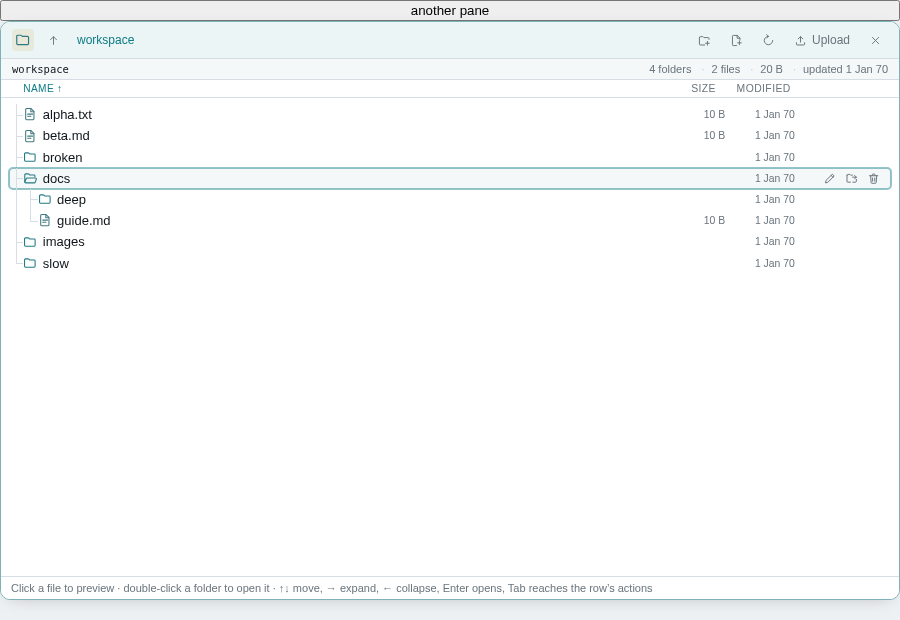
[tabindex]:focus-visible); the row's actions are revealed by focus the same way the sidebar's row actions are.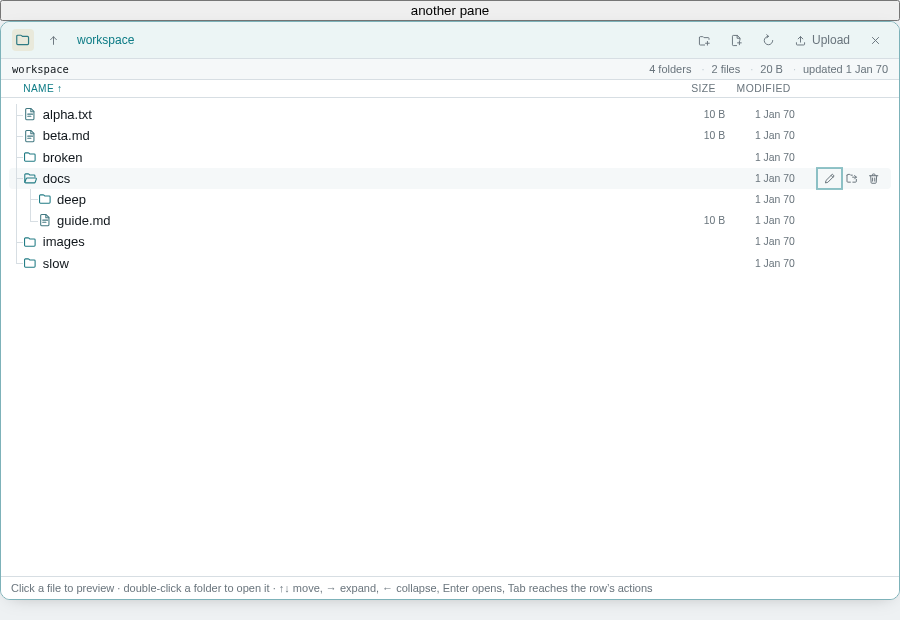
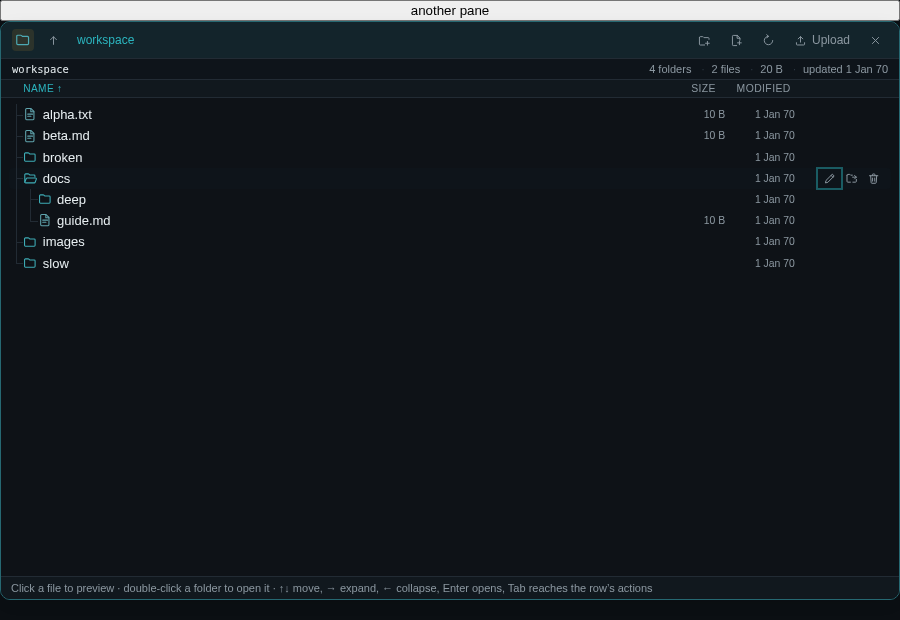
Focus that survives what the listing does next
Focus is kept by session and path, never by row index — a sort or a refresh reorders every row, and an index would silently mean a different file. It is restored to the row it came from when a preview closes, a rename or a move commits, or a confirmation is cancelled. When the row itself is gone, the focus goes to the next thing in the same folder, else the previous one, else the folder itself.
A late answer never takes the keyboard. A directory read that lands while the operator is in another pane repairs which row is the tab stop and stops there. Moving the browser's focus needs a user action in this pane, and the request expires.
The delete confirmation opens on Cancel, not on Delete: the key that opened it is still on its way up, and a Space release landing on a freshly focused Delete would delete the file with one press.
Four things found on the way
useDirreturned the previous folder's entries for one render after the root changed, so rows were drawn with paths that never existed —docs/alpha.txtfor a root-levelalpha.txt. It lasted a frame, but a click landing in it would have acted on that path.- Folder expansion lived in each row's local state, where a key and a click could disagree, and
aria-expandedhad nothing to read. - The rename and create fields committed on Enter mid-IME-composition — the key that accepts a candidate would have renamed the file to half a word.
- Tabbing into the pane did not make it the pane the app considers current.
How it was tested
Two suites, both discovered by the normal runner:
web/test/treeNav.test.mjs— the key contract and the focus fallback as pure functions over the rows on screen (35 checks, milliseconds).web/test/filesKeyboard.test.mjs— the realFilesPanein Chromium with fixture file APIs, driven only by the keyboard: no test clicks or hovers a row to prepare it. 90 checks covering navigation, focus-versus-action, slow/empty/unreadable folders, sorting under the focus, preview and return (expansion and scroll), download, rename, Move (nested folder, current root, invalid destination, cancel), delete (cancel and explicit confirm), typing and IME in the row's fields, and the pointer, drag-and-drop, narrow-pane and both-theme regressions.
The accessibility tree is read from the browser over CDP rather than read back off our own attributes: one tree with a name, eight treeitems named after their files, children announced at level 2, folders carrying expanded and files not.
Thirteen deliberate mutations — remove the key handler, the roles, the roving tabindex, the button guard, the IME guard, the confirmation's focus, the focus restore, the scroll-into-view, the focus-within CSS, the upload's keyboard, and three of the focus-repair rules — each break the suite, and each on the check that names the rule.
npm test in web/: 25 suites passed. npm run build (typecheck + production build): clean. No server change, so no server suite applies.
Chromium only — no screen reader is installed in this container, so the announcements above are what the browser's accessibility tree contains, not a NVDA/VoiceOver transcript.